
Course life cycle FAQ
This article deals with some typical questions relating to the course life cycle process. Further information on the process can also be found on the Moodle overview page.
By regularly cleaning up courses, we are pursuing the following goals:
- Fast and reliable Moodle platform
- By regularly cleaning up old courses and the associated release of storage space and computing power, you help to keep our Moodle platform performant and reliable. This also enables us to operate the system as energy-efficiently as possible.
- Relevance and up-to-dateness of courses in the system
- By regularly reviewing and deleting courses, we ensure that the courses and materials provided in the system are as up-to-date and relevant as possible.
- Better clarity and structure
- The reduced number of courses in the system makes it easier for you to maintain an overview, as your dashboard is no longer overloaded with old courses.
This means you can find the courses you want much more quickly.
- The reduced number of courses in the system makes it easier for you to maintain an overview, as your dashboard is no longer overloaded with old courses.
- Data protection
- As every course also stores data about the students enrolled, the course lifecycle and the associated purging of courses actively contributes to data protection.
- Clarity about retention periods and possibilities for reusing content
- The course lifecycle means that the standard retention periods for Moodle courses are documented and accessible. New options for reusing content have been created and our instructions and support for this have been improved, see “I would like to reuse content from an older course” below.
Courses that are in a course category older than 8 semesters are scheduled for deletion, and all instructors and assistants of the course are notified by email. At the start of the course lifecycle in May 2024, this applies to the semesters SoSe 2018 to SoSe 2020. Courses from the semesters WiSe 2016/17 to WiSe2017/18 are still in the system but have been hidden for over 2 years. A separate workflow will follow for these three semesters.
Courses in the course area “Semesterübergreifende Kurse" (Cross-semester courses) are not yet affected by the course life cycle. You can of course also have certain of your courses deleted by us at any time.Get in touch with us, we will support you.
Of course, your Moodle courses will not be deleted from one day to the next and you will be informed in advance via your registered e-mail address when your Moodle courses are scheduled for deletion.
The cleanup process runs twice a year and is initiated 1 month after the start of each lecture period. Only courses in course categories that are at least 8 semesters in the past are scheduled for deletion. More recent and cross-semester courses remain unaffected.
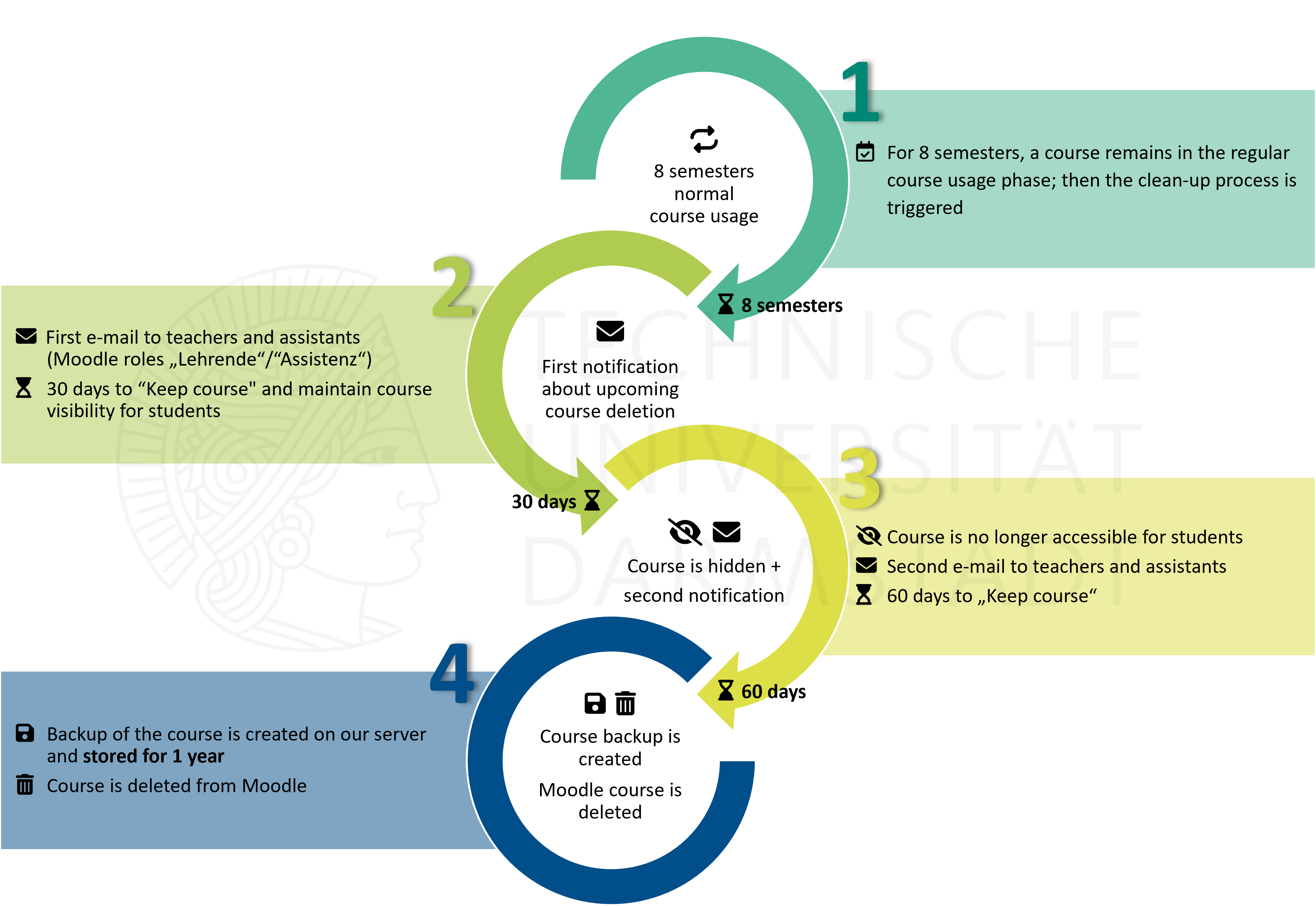
Example: A course from the summer semester 2020 is scheduled for deletion in the clean-up process in the summer semester 2024.
- You will therefore receive an email (email A) in mid-May 2024 informing you of the pending deletion. If you (or other lecturers/assistants of the course) do not take any action, the course will be hidden from students 30 days later. The course will still be accessible to you at this time and you will still be able to view your activities and materials and, if necessary, make your own backup or transfer content to newer courses.
- 30 days after the first e-mail, you will receive a second e-mail (e-mail B) and have another 60 days to postpone the deletion.
- If again no action is taken after these 60 days, a backup of the Moodle course is automatically created on our server and the course is deleted from Moodle. The deletion will therefore take place 90 days after the initial email, in this case at the end of July. The created backup will be retained on our server for one year before being permanently deleted.
Postponing the deletion process excludes a course from the clean-up process for 6 months. After these 6 months, you will receive e-mail A again. After 30 days without action, you will receive e-mail B again, and after a further 60 days without action, the course will be automatically backed up and deleted. Again, you have the option of postponing the clean-up process for another 6 months.
The following table shows the timeline of the process using the summer semester 2024 as an example.
Note that the specified number of days means that the subsequent activities are only triggered on the next working day.
| Date | Action | Time remaining |
|---|---|---|
| 16.05.2024 |
|
Until course is deleted from Moodle: 90 days Until course is hidden for students: 30 days |
|
17.06.2024 (originally 15.06. – but as this is a Saturday, the following working day now applies) |
|
Until course is deleted from Moodle: 60 days |
| 16.08.2024 |
If no action was taken by the teacher/assistant: 1. Course backup file is created 2. Course in Moodle is deleted |
Until the course backup file is deleted: 1 year |
|
18.08.2025 (originally 18.08. – but as this is a Saturday, the following working day now applies) |
Course backup file is deleted |
Our Moodle platform is explicitly not designed as an archive system.
This is partly due to data protection regulations: When students leave the university, personal data must also be deleted after a short follow-up period – Users in Moodle are then anonymized so that no conclusion can be drawn about the individuals. Consequently, assessments and submissions can no longer be accessed.
In order to archive content and coursework properly, you should carry out a course backup at the end of the semester and also save your students' submissions.
We support the reuse of your created content as a matter of course. The desired reuse of content is not a fundamental argument against deleting a course – there are various options depending on the case.
- Sharing Cart
- Import into current course
- Exporting and importing question bank
- Exporting and importing grades
- Download submissions
- Save complete course
- Meta course as a semester-independent course
Please contact us and together we will find the best solution.